






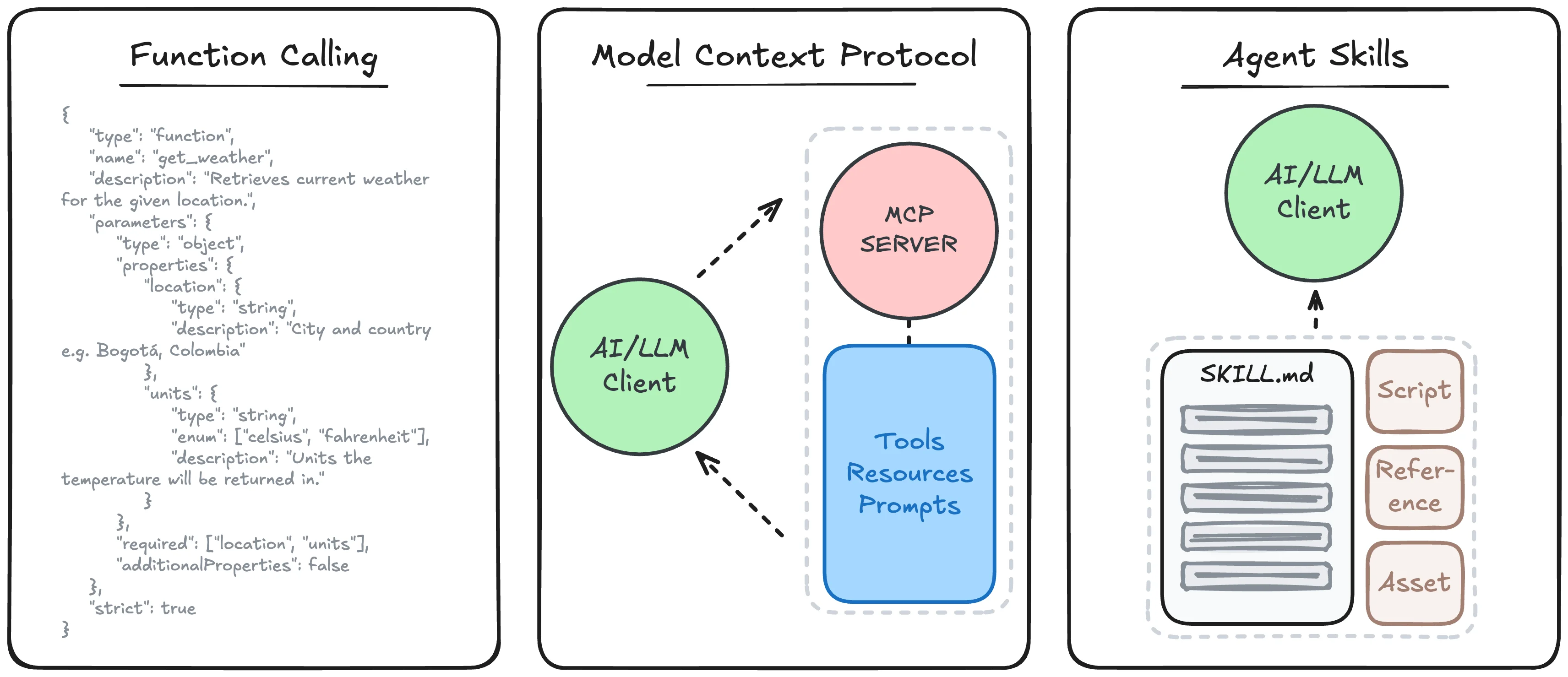
As AI application development matures and evolves, standards have emerged that outline how a model or product should connect to external sources and invoke additional outside actions. This began with function calling, introduced by OpenAI through GPT-4 and GPT-3.5-Turbo fine-tuning, summarized as:
A model interface pattern where the LLM emits a structured “tool call” (function name + JSON arguments) instead of free text, allowing the host application to execute the tool and return results back to the model. It standardizes how the model asks for an action, but execution and orchestration are handled outside the model.
This technique became widely adopted, allowing LLMs to not just generate text, but take actions with executed API calls. However, two issues still remained: each provider handles tool signatures differently and the burden of tool execution fell on the client developer. Tool definitions were not directly interchangeable between models or provider APIs, and tool execution was often a one-off implementation for each application being developed. This was quickly addressed by Anthropic with the introduction of the Model Context Protocol, or MCP:
MCP is a client–server protocol for discovering and invoking tools (and optionally resources/prompts) via a standardized API, so agents can integrate with many external systems without bespoke per-tool wiring. It standardizes how tools are exposed and executed across systems, independent of any single model vendor.
Similar to function calling, MCP was quickly adopted, offering an interoperable solution for sharing complex tools. Simply develop the logic and execution following the standards, and any client that supports MCP can then surface and handle the functions in a consistent manner. While resources and prompts are also supported within MCP, most rely on the protocol for function handling.
Which left a gap for effective resource and prompt handling- until Anthropic dropped another standard for Agent Skills:
Agent Skills is a packaging format for reusable agent capabilities (instructions, workflows, and optional scripts/assets) that an agent runtime can discover and load into model context on demand. It standardizes how procedural expertise is organized and injected to guide the model’s behavior across tasks.
Skills provide a way to compartmentalize complex or domain specific workflows, resources, and tools into a discoverable and actionable format. They rely on outlining everything related to the task they support (e.g., PDF handling, report generation, etc.), supported by scripts and assets, purpose-made to guide LLM agents in handling extensive, multi-step workflows in a token-efficient manner. Rather than provide all context up front, we allow the LLM to dynamically load and understand the information as it needs it and run more sophisticated tools as scripts.

Skills offer an appealing solution for defining and sharing advanced workflow automation without specific provider lock-in, and are being increasingly integrated now that the format has been open sourced. So with this exciting advancement, we’ll cover the basics of what Agent Skills are and how to create your own!
What Uses Skills
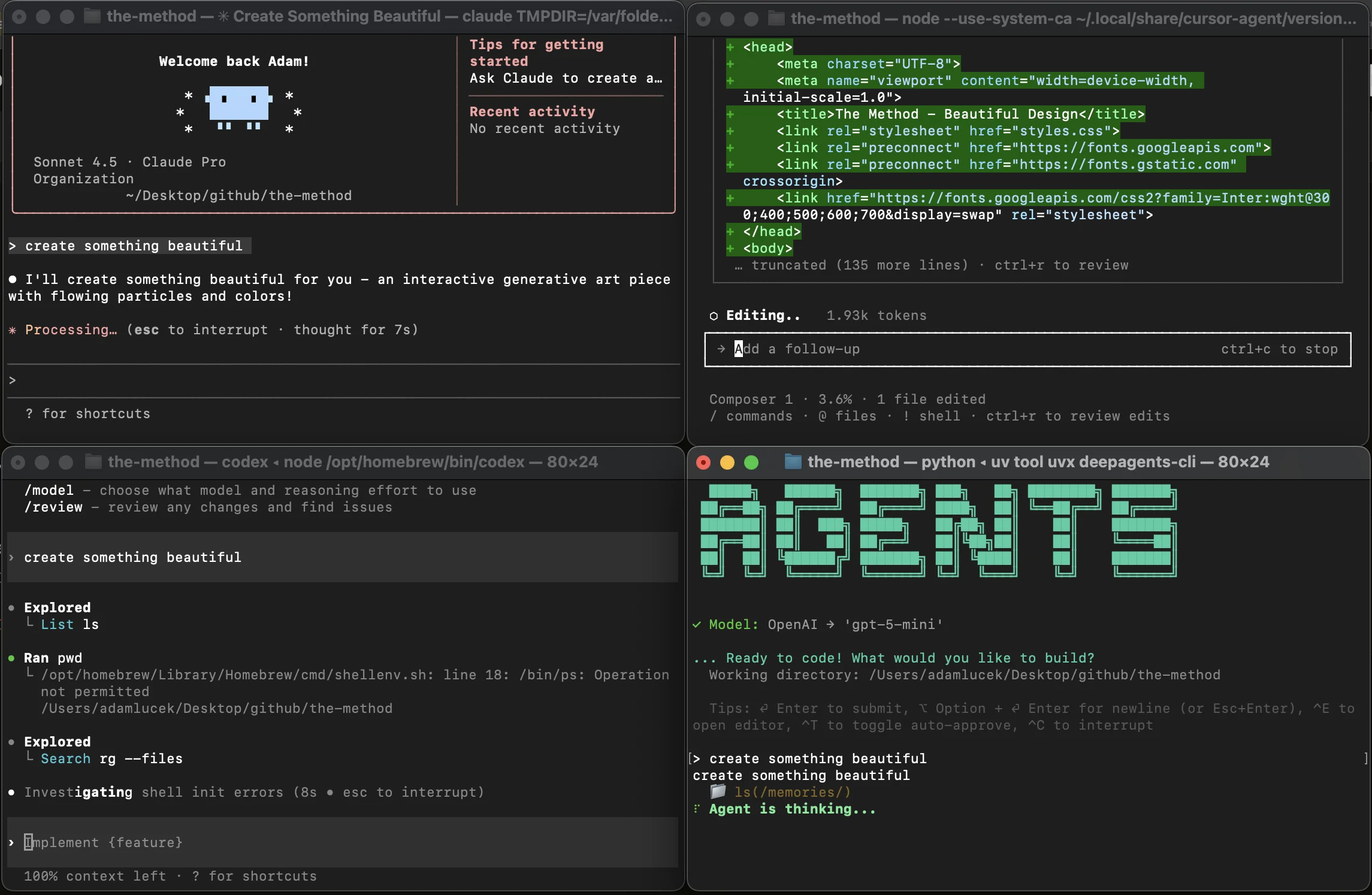
Before we begin, where exactly did Agent Skills come from? When considering function calling, context engineering, and LLM application orchestration, we see multiple overlaps that led us here.
Filesystem-Based Agents
Popularized by Claude Code & OpenAI’s Codex, we’ve seen the adoption of CLI-based and filesystem-based agents. These are agent harnesses built around foundation models that often allow an LLM to operate within a terminal and take actions by writing and executing bash commands. This approach builds on two findings:
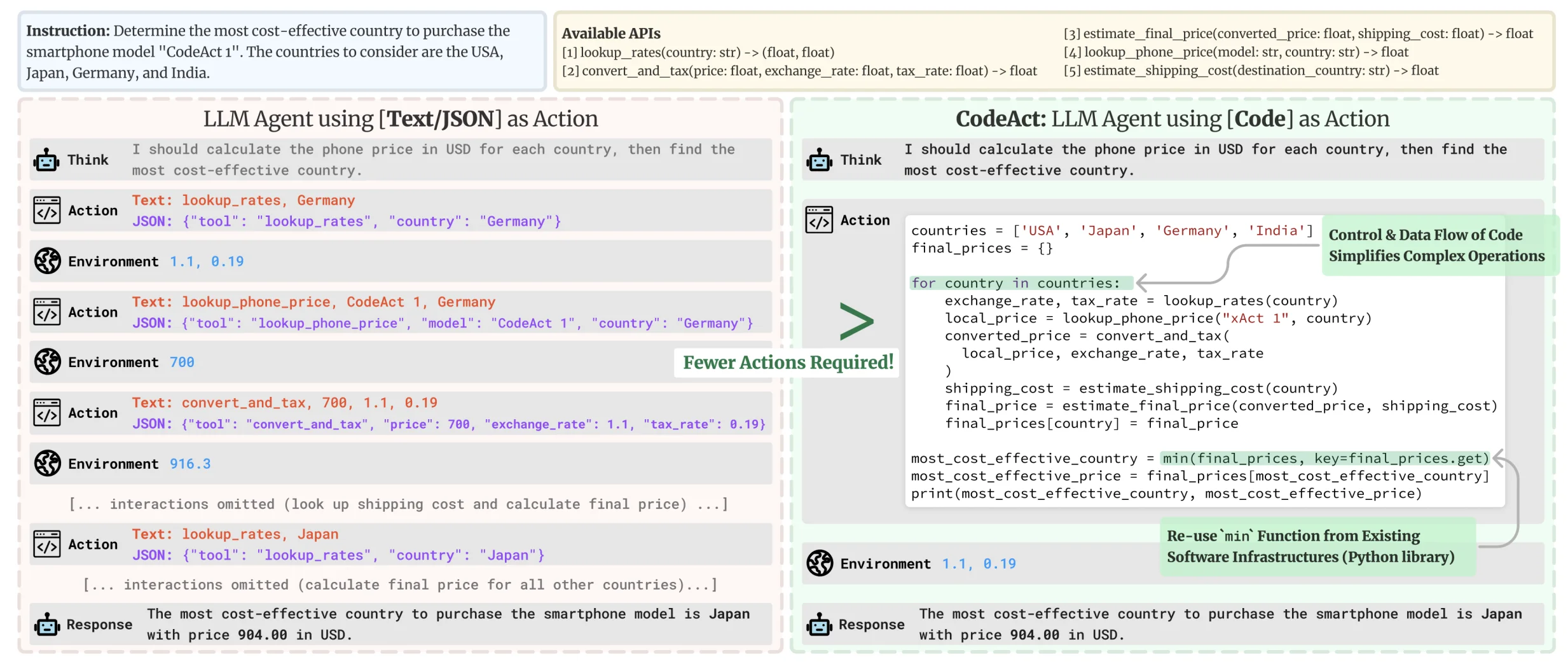
Executable Code Actions Elicit Better LLM Agents
First, we can extend an LLM’s ability to perform complex actions by giving it general functions within an extensible environment, bypassing the requirement to define specific tools for specific scenarios. Allowing agentic systems to write, run, and react to code has led to more robust and flexible task completion, leveraging the model’s inherent code generation and comprehension abilities. We rely on composable and general tools as code to efficiently empower LLM agents to tackle a broad set of digital use cases.
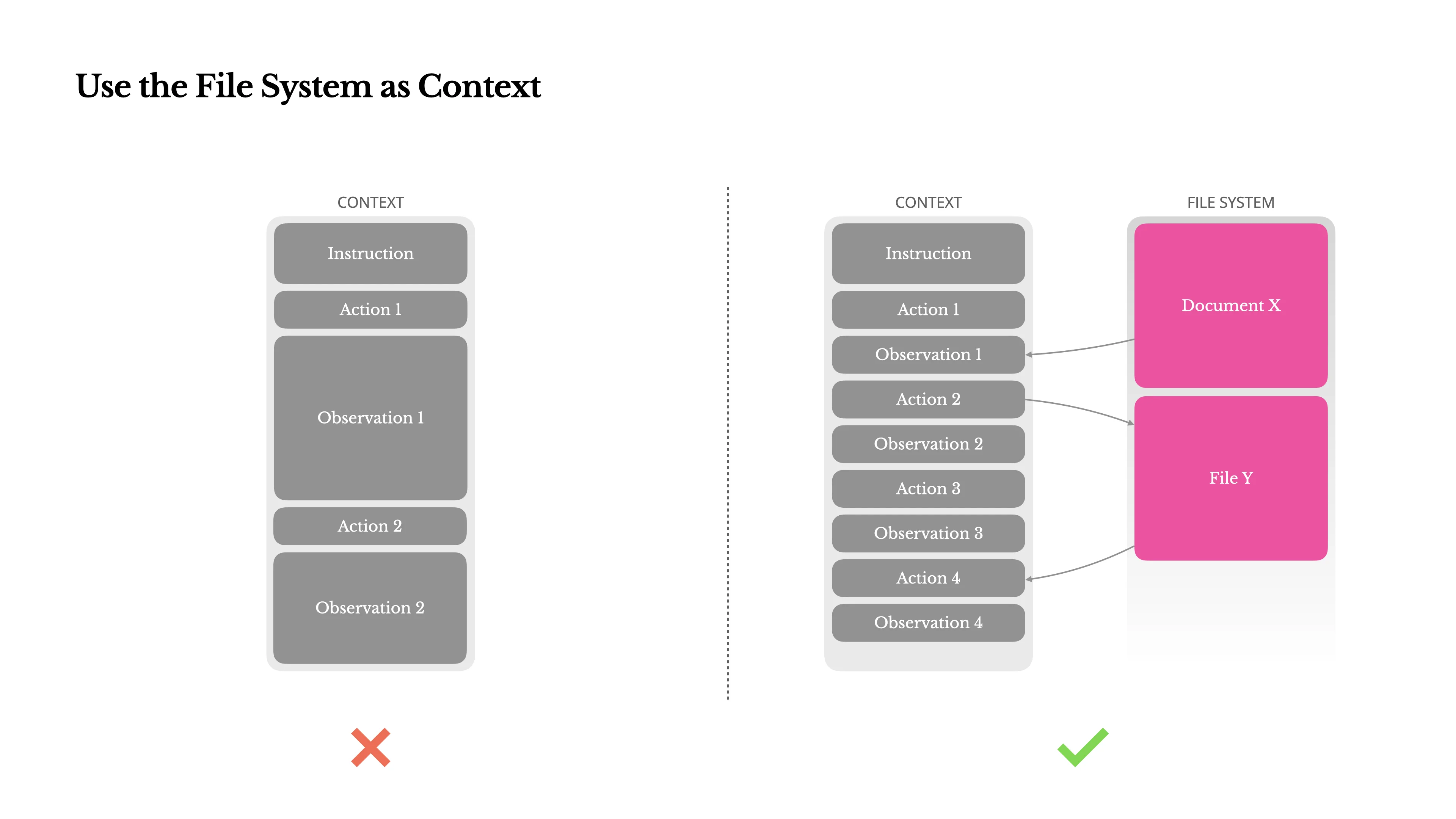
Context Engineering for AI Agents: Lessons from Building Manus
Second, we can manage context and memory via computer file system navigation. Giving these agents common file handling commands like ls, cat, grep, touch, mkdir, etc., fits neatly into the terminal environment and allows the discovery, creation, and storage of knowledge via literal documents. Originally implemented as a way to enable coding agents to work within large codebases, this method was found to work as a form of persistent memory. Given an agent has the aforementioned ability to discover, load, and modify files, it can then easily reference past artifacts without needing to keep the contents in context (i.e. in a system prompt or working memory). An agent can reference, act, and offload unnecessary context without exceeding token limitations.
AGENTS.md
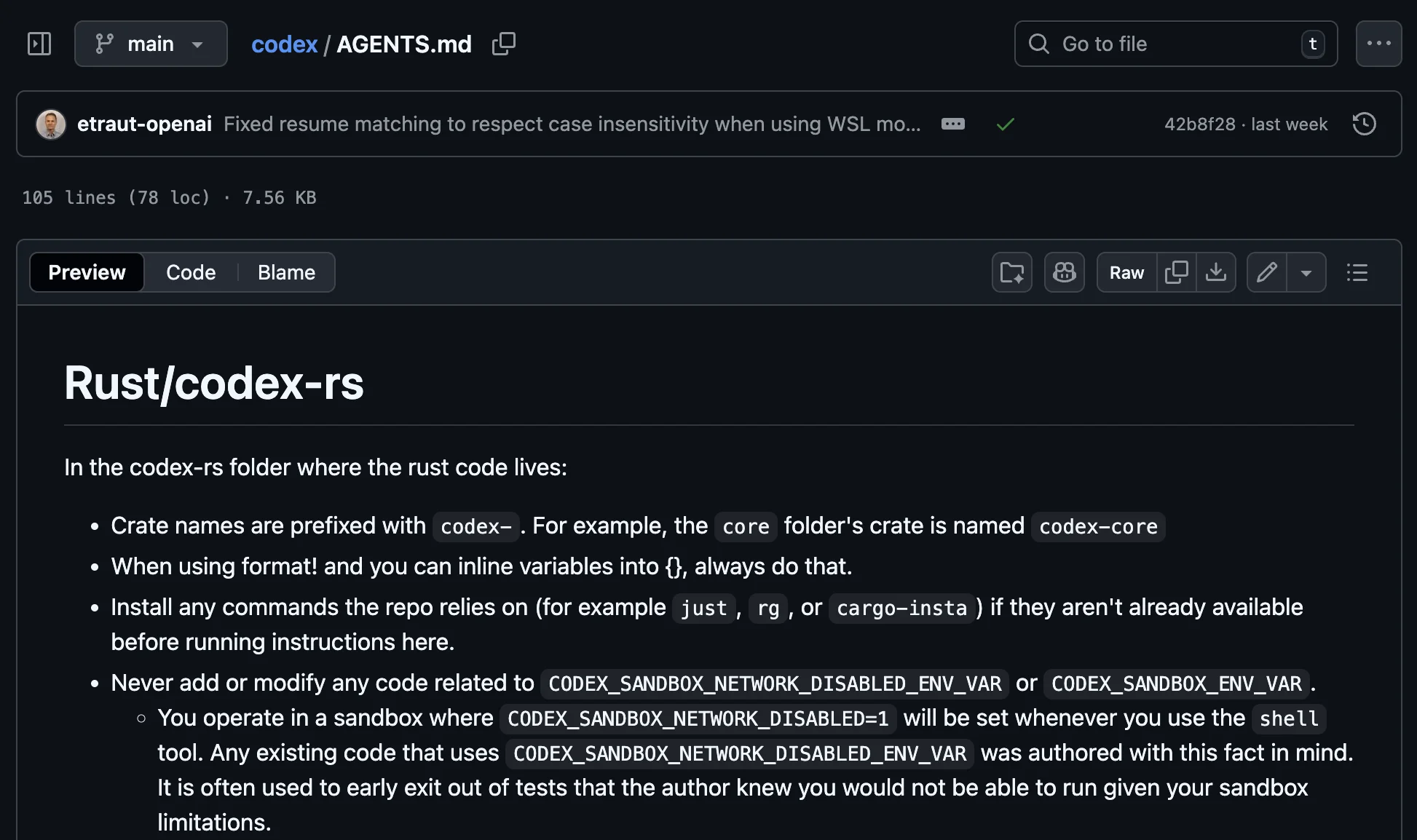
These commonalities among popular agents led to developers recording and sharing repo-specific knowledge via markdown files. It is now common to see a top level AGENTS.md file that provides “precise, agent-focused guidance” in an LLM-friendly format. In more sophisticated repos, developers also include additional feature-specific markdown files in subfolders to provide even more specialized context. This allows any agentic coding system to quickly discover and inject repo-specific context either generally, or on more specific components.
Note: delivering LLM-friendly context for domain specific knowledge is an evolving field. We also see this concept applied with efforts like llms.txt, a proposed standard by Jeremy Howard to allow LLMs to effectively use websites.
The Agent (Skills) Layer
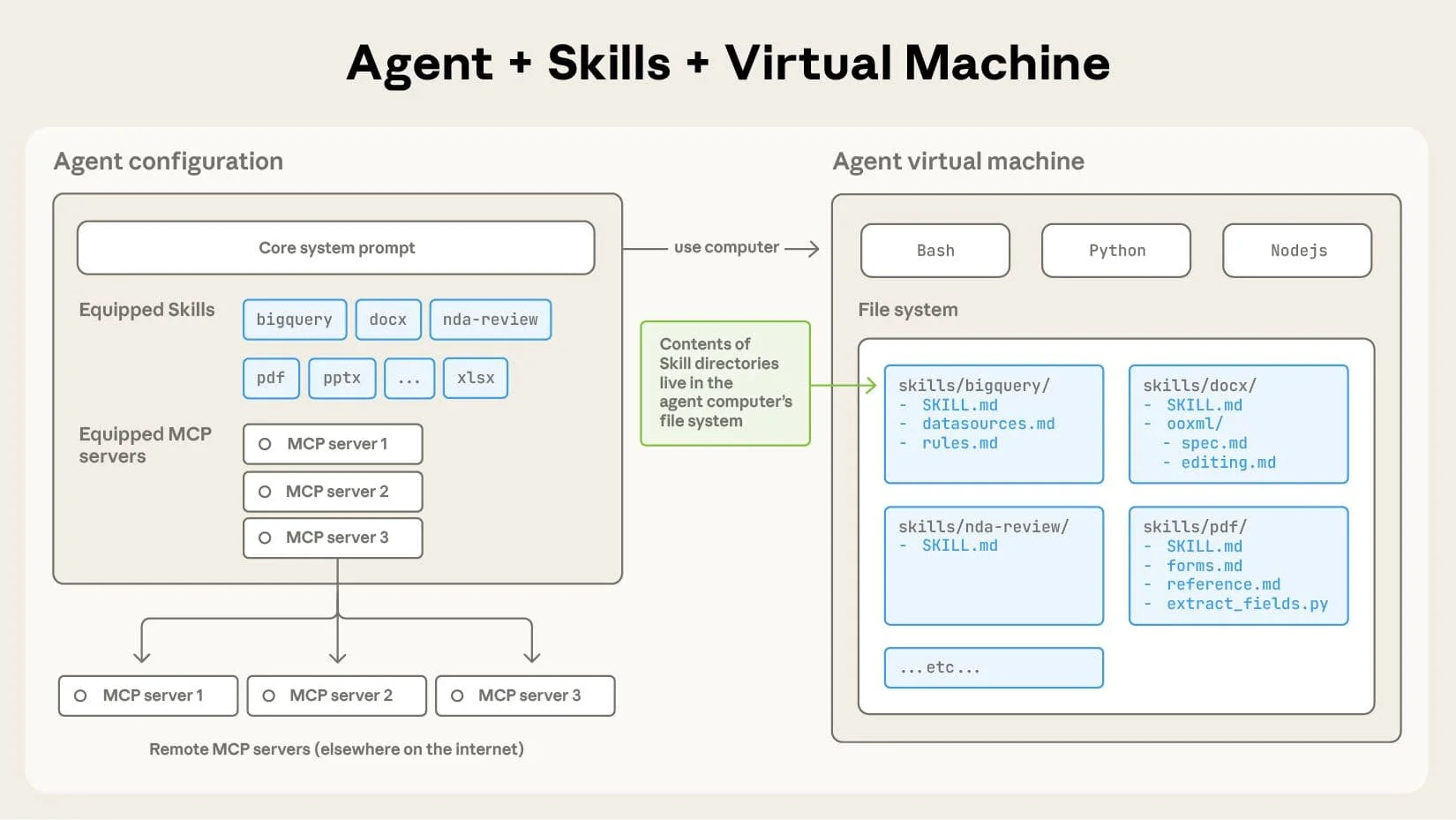
Equipping agents for the real world with Agent Skills
Agent Skills then builds on these concepts by packaging all context and materials that support a specific behavior. By outlining a workflow, concept, or desired functionality in text format, any filesystem-based agent can quickly adopt and understand its contents by using its built-in tools and environment. While conceptually similar to AGENTS.md, Agent Skills extends the idea outside of just code understanding to bundle documentation, tools, examples, and supporting materials into actionable, portable units of functionality.
Skills vs Tools vs MCP vs The World
With various conceptually overlapping standards being defined, I often see confusion about the role each plays in the lifecycle of an LLM interaction. So to clear up any confusion, let’s briefly visualize and outline function/tool calling, model context protocol, and skills.
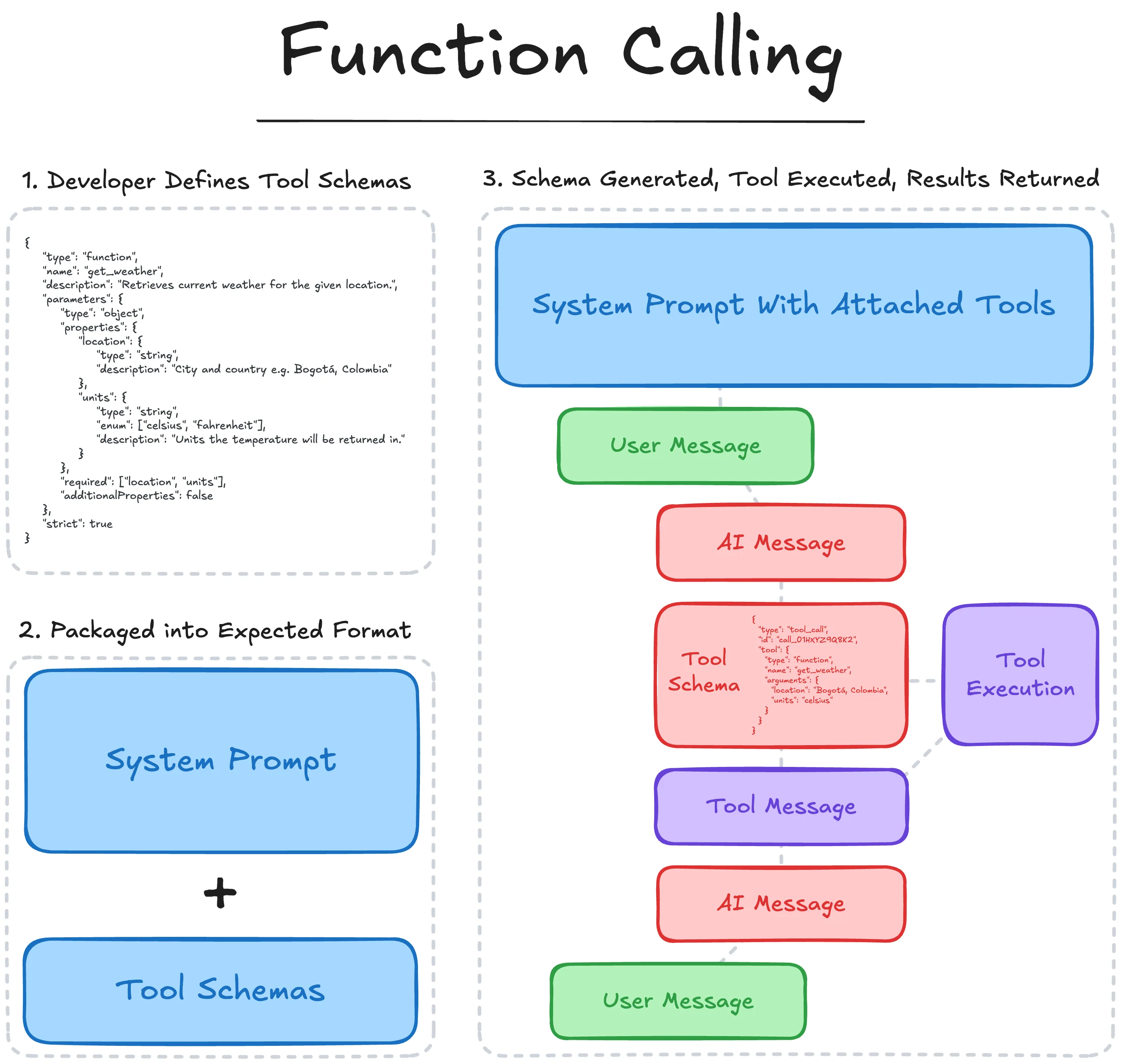
Function calling follows the process:
- The developer defines the schema of the external Tool or API
- Metadata about the schema (usually general and keyword specific descriptions) is passed to the model along with any application specific instructions.
- During inference, the LLM can choose to ‘use’ an available tool by outputting the corresponding tool call schema, identifying which tool it has selected and the keyword arguments.
- The application supporting the LLM then identifies and parses this selection, invokes the specified tool with the given parameters, and returns the result back to the LLM as a tool message.
- The LLM then uses this context to take further action or inform its subsequent generation.
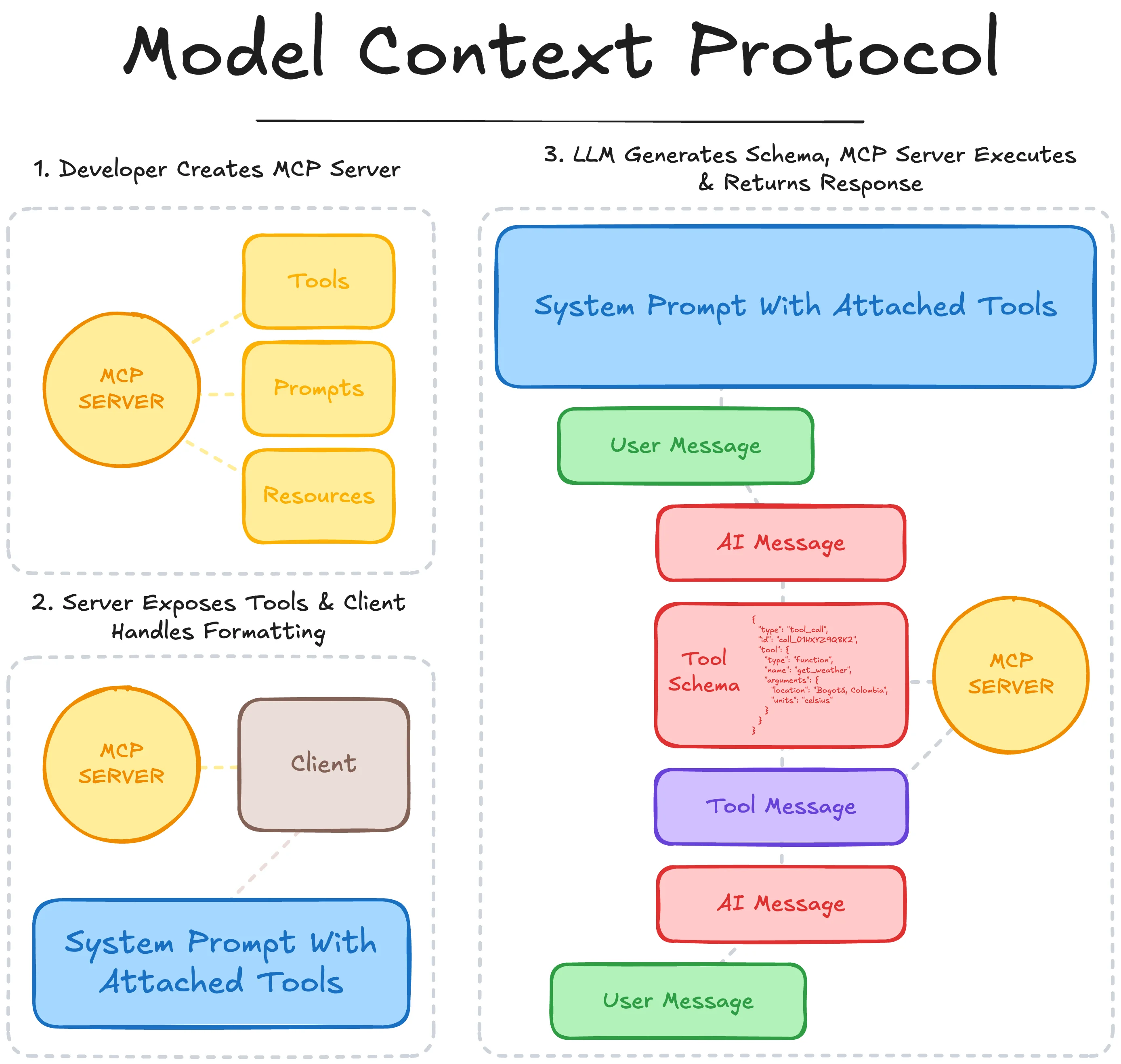
Model Context Protocol follows the process:
- The developer creates an MCP Server that defines the tools’ schema and execution logic (and optional prompts/resources) following the MCP standard.
- A supporting client connects to the MCP server, and is able to surface available tools and their schemas, which are then passed to the LLM as available actions to be taken.
- During inference, the LLM can choose to ‘use’ an available tool by outputting the corresponding tool call schema, identifying which tool it has selected and the keyword arguments.
- The MCP client identifies and parses this selection, passing the parameters to the MCP server which executes the tool and returns the results to the client.
- The MCP client returns the result back to the LLM as a tool message, which then uses this context to take further action or inform its subsequent generation.
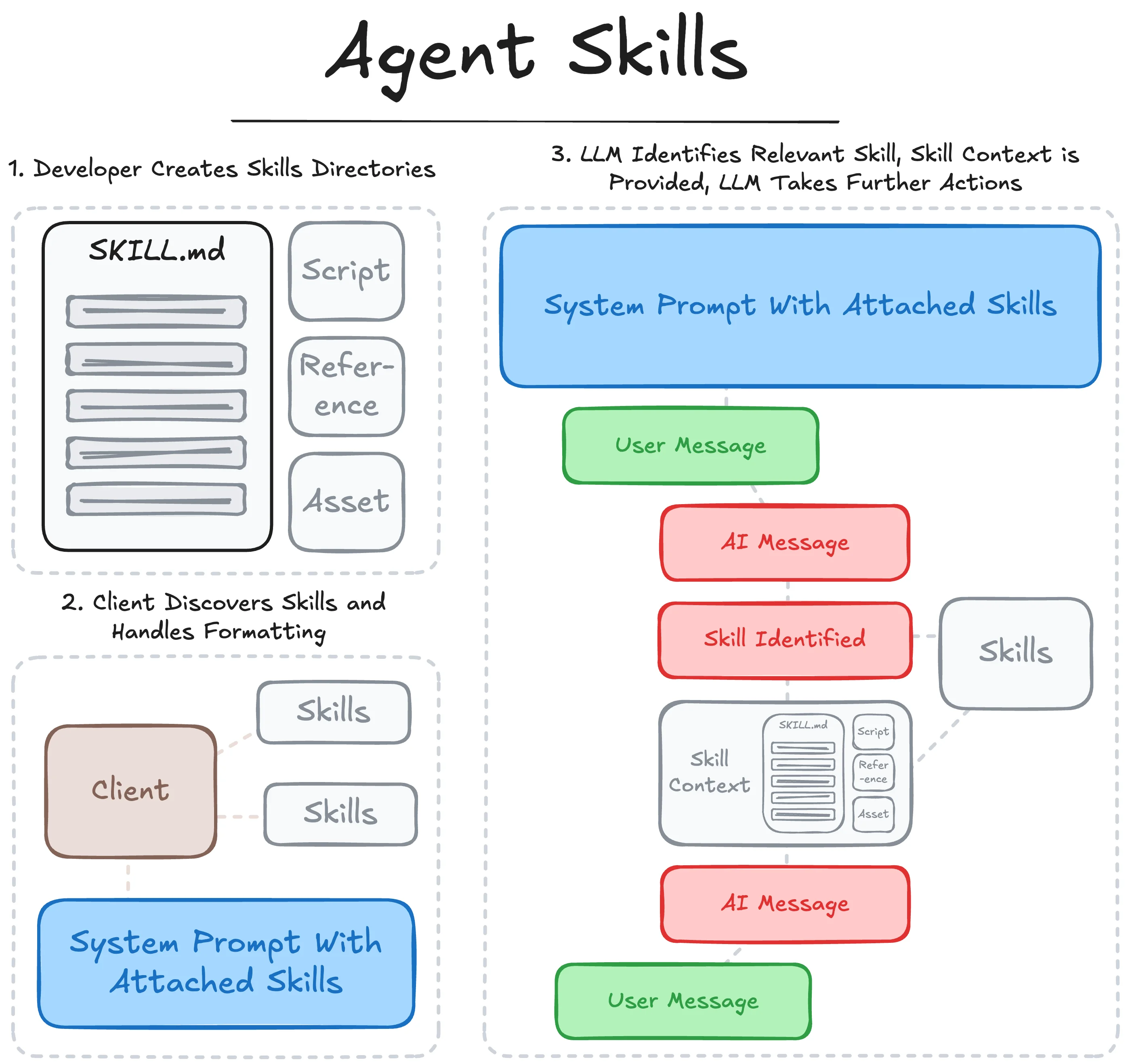
Agent Skills follows the process:
- The developer creates a SKILL repository with a primary
SKILL.mdfile and supporting resources, assets and scripts. - A supporting filesystem-based agent client discovers the available skills and loads the name and description metadata, which are then passed to the LLM as available skills to reference.
- During inference, the LLM can choose to reference an available skill by navigating to the corresponding directory and loading the primary
SKILL.mdfile. - With the
SKILL.mdcontents injected into the LLM’s context, the LLM can then follow the provided instructions, load additional information from resources, or use provided tools (whether executed as a script, formatted as a function call, or standardized through an MCP server) to take further action or inform its subsequent generation.
So as we can see, these concepts are complementary to each other and work to either standardize or extend tool use and instruction functionality. In real-world applications, all three concepts are used together where they best fit.
For quick reference, I have a (scrollable) summary table here:
| Function Calling | Model Context Protocol (MCP) | Agent Skills | |
|---|---|---|---|
| Primary Role | Interface layer for single tool use – ensures the model can precisely ask for one function’s execution at a time, yielding structured outputs. | Orchestration/Integration layer – manages connection to many tools, routing the model’s calls to the correct service and returning results uniformly. | Knowledge & Workflow layer – provides the model with step-by-step guidance and domain knowledge so it can handle tasks effectively and consistently. |
| Purpose | Let the LLM invoke specific functions during generation to get external data or perform actions. Focused on translating a user request into a single API/tool call when needed. | Provide a unified interface for AI agents to discover and call external tools/APIs in a structured way. Focused on consistent execution and integration across many tools. | Provide a format to inject procedural knowledge and workflows into the agent. Focused on how to perform complex tasks and extend agent expertise via on-demand instructions. |
| What it Defines | Function interface: the signature (name, params) of functions and the model output that invokes them. | Tool interface & lifecycle: how to list available tools, the call format, and how results are returned. | Skill package format: how to structure a skill (metadata + instructions + optional code/assets). Defines how agents should discover skills and progressively load their content. |
| Layer in Stack | Model API level – the LLM’s output format includes function call schemas. The developer’s orchestration interprets and executes them. | Agent orchestration layer – a protocol between the AI agent and external service providers. Sits below the model; the model’s intents are carried over MCP by the client to tools. | Knowledge/context layer – part of the model’s context/prompting. Skills are loaded into the model’s context (system or prompt) as needed to guide its behavior. Does not require external calls unless the skill triggers them. |
| When Agent Decides to Use It | Triggered dynamically by the model during generation if it recognizes a query needs the function’s info or action (based on prompt and function descriptions). E.g., model sees “weather?” -> generates a get_weather function call. | Can be triggered by model’s intent (often via a function call output) or by system logic. The MCP client might automatically query tools/list at start, and the model can see available tool names to invoke if needed. Actual call execution is controlled by the client but executed through the MCP server. | Preemptively loaded in prompt (metadata), so the model is aware a skill exists. The model decides to activate a skill when it judges the current task matches a skill’s description. Activation (loading full instructions) is an internal action by the agent; from there, the model follows those instructions. Using a skill might also involve executing skill-provided code via the agent’s tool mechanism. |
| Example | User: “What’s the weather in Paris?” Assistant (function call): get_weather({"location": "Paris"})(tool executes, returns {"temp":15°C})Assistant: “It’s 15°C in Paris.” | Agent starts up and connects to an MCP server exposing get_weather.User: “Weather in Paris?” Model: function call intent for get_weatherMCP client sends tools/call to server → server returns resultAssistant: “15°C in Paris.” | User: “Please generate a quarterly report.” Assistant sees skill: “report-generation” (description: how to prepare quarterly reports) Assistant activates skill: loads instructions that say how to gather data, format it, etc. It may then call tools (via function/MCP) as instructed (e.g., a database query tool) and step-by-step produce the report according to the skill guidelines. |
What Makes Up a Skill
For detailed documentation, please reference the official page: Agent Skills and Anthropic’s phenomenal Agent Skills Best Practices. The following section contains my abridged interpretation of and references to these resources.
An Agent Skill is simply a lightly formatted markdown file with supporting files in the following directory structure:
skill_name/
├── SKILL.md
├── scripts/
├── references/
└── assets/
SKILL.mdincludes the expected metadata about the skill and full outlinescripts/contains any related scripts that support the workflow outlined in the skillreferences/contains additional documentation referenced, but not expanded on, in the mainSKILL.mdassets/contains static resources like templates, diagrams, schemas, etc.
Only the directory folder and SKILL.md are required to create a valid skill; scripts/, references/, and assets/ are optional subdirectories and may be excluded if unnecessary.
Formatting SKILL.md
The contents of SKILL.md contain two sections: a frontmatter and a body. The frontmatter includes the necessary metadata about the skill, which is parsed by the supporting client to surface to the model, and the body contains everything else about the skill.
---
name: skill-name
description: A description of what this skill does and when to use it.
---

# Body Content
While above is the minimum viable skill, the following frontmatter parameters are accepted:

And with that- you’ve created a skill! Of course, the outline is the simple part; effectively thinking through, structuring, and defining a workflow is where the real work lies. Some best practices to consider:
- Conciseness is key: Challenge each piece of info - “Does the model really need this?” Assume the model is already capable
- Set appropriate degrees of freedom: High freedom (text) for multiple valid approaches; Low freedom (scripts) for fragile operations
- Frontload information: Include important information or section references early on
- Use gerund form naming:
processing-pdfs,analyzing-spreadsheets,managing-databases, Not:documents,data,files - Matching names: The SKILL.md name and skill directory name must match
- Write in third person: Good: “Processes Excel files” | Bad: “You can use this to process Excel files”
- Be specific with key terms: Include what it does AND when to use it. Include triggers/contexts
- Keep SKILL.md under 500 lines: Split content into separate files when approaching this limit
- Limit metadata: Keep metadata to a meaningful 100 tokens or less as this is always loaded
- Avoid deeply nested references: Keep references one level deep from SKILL.md to ensure complete file reads
- Add table of contents for long files: For reference files over 100 lines, include a table of contents at the top
- Break complex tasks into steps: Provide checklists that the model can copy and check off as it progresses
- Use conditional workflows: Guide the LLM through decision points: “Creating new?” → path A; “Editing?” → path B
- Use consistent terminology: Pick one term and stick with it. Not: mix “API endpoint”, “URL”, “API route”, “path”, etc.
- Template patterns: Provide templates for output format. Strict for APIs/data; flexible for analysis
- Examples pattern: Provide input/output pairs like in few-shot prompting
- Avoid Windows paths: Always use forward slashes (scripts/helper.py) not backslashes - works cross-platform
- Use relative paths: Rely on the skill root when referencing scripts, references or assets
- Avoid too many options: Provide a default with escape hatch, not “you can use pypdf, or pdfplumber, or…”
- Error handling: Handle errors explicitly in scripts
- List package dependencies: List required packages and verify they’re available in execution environment
Following these practices allows a supporting agent to effectively surface necessary information when needed and reliably execute the capability or workflow outlined in the skill. This relies on the important approach of progressive disclosure, or only loading context as necessary, leading to efficient token usage given the limited and precious context window.
BYOS (Bring Your Own Skill)
For the example section of this blog, I wanted to create a skill I would actually use- which led me to turn one of my most used applications into a collaborative workspace with an agent. That is, of course, the beautiful Apple Notes application. As an avid ‘second brain’ concept hater (one is plenty), I find myself drawn to the simplicity and extensibility of the built-in notes app on my laptops. Thus, we shall create a skill that I can load into repositories to allow an agent to read and write notes directly where I’d see them.
apple-notes SKILL.md
After some iteration, I authored the following SKILL.md file:
---
name: apple-notes
description: Interact with the Apple Notes app. CRUD operations for persistent storage of thoughts, data, and information across sessions.
license: MIT License
metadata:
  author: "lucek.ai"
  version: "1.0.0"
---

# Apple Notes Creation & Editing

## Overview

Tools to interact with Apple Notes. Notes are scoped to an automatically created `agent-notes` folder. Notes are formatted using HTML—supported elements are listed below.

## When to Use

- Storing information that should persist across sessions
- Saving notes, ideas, or data the User wants to keep
- Creating task lists, reminders, or reference material
- When the User explicitly asks to save/remember something in notes

## How to Use

1. **List** existing notes to see what's available
2. **Read** a note to get its HTML content
3. **Create** new notes with HTML-formatted body
4. **Delete** notes by title (to edit: read → delete → create)

## Usage

python scripts/list-notes.py
python scripts/create-note.py --title "Note" --body "<div>Content</div>"
python scripts/read-note.py --title "Note"
python scripts/delete-note.py --title "Note"

> **Note:** The `--title` is automatically formatted as an `<h1>` header at the top of the note. Only include body content in `--body`.

## HTML Reference

| Element | HTML | Example |
|---------|------|---------|
| Title | `<h1>` | `<h1>Title</h1>` |
| Heading | `<h2>` | `<h2>Heading</h2>` |
| Subheading | `<h3>` | `<h3>Subheading</h3>` |
| Paragraph | `<div>` | `<div>Text here</div>` |
| Bold | `<b>` | `<b>bold</b>` |
| Italic | `<i>` | `<i>italic</i>` |
| Underline | `<u>` | `<u>underline</u>` |
| Strikethrough | `<strike>` | `<strike>deleted</strike>` |
| Monospace | `<tt>` | `<tt>code</tt>` |
| Line break | `<br>` | `<br>` |
| Bullet list | `<ul><li>` | `<ul><li>Item 1</li><li>Item 2</li></ul>` |
| Numbered list | `<ol><li>` | `<ol><li>First</li><li>Second</li></ol>` |
| Table | `<object><table>` | See below |

### Table Example

`<object><table><tbody><tr><td>A</td><td>B</td></tr><tr><td>1</td><td>2</td></tr></tbody></table></object>`

## Limitations

- **Checklists** - Stored internally, checkbox state not accessible (renders as regular bullet list)
- **Links** - Stripped on save
- **Highlights** - Stored internally by Apple Notes
- **Images** - Technically possible (base64) but impractical for LLM use
- **Attachments** - Cannot be added programmatically
As referenced in the primary file, I have lightweight scripts for the various read, write, and delete operations. Below is the create-note.py script, which wraps AppleScript commands.
Note: AppleScript is weird
#!/usr/bin/env python3
"""
Create a new note in the agent-notes folder.

Supports HTML formatting in the body (bold, italic, lists, tables, etc).
Creates the folder if it doesn't exist.

Arguments:
    --title: Note title (required)
    --body: Note body with HTML formatting (required)

Usage:
    python create-note.py --title "My Note" --body "<div>Content here</div>"
"""
import argparse
import subprocess

FOLDER = "agent-notes"

parser = argparse.ArgumentParser(description="Create a note in agent-notes folder")
parser.add_argument("--title", required=True, help="Note title")
parser.add_argument("--body", required=True, help="Note body (HTML Format)")
args = parser.parse_args()

title = args.title.replace('"', '\\"')
body = args.body.replace('"', '\\"')

script = f'''
tell application "Notes"
    if not (exists folder "{FOLDER}") then
        make new folder with properties {{name:"{FOLDER}"}}
    end if
    make new note at folder "{FOLDER}" with properties {{body:"<h1>{title}</h1><br>{body}"}}
    return "Created: {title}"
end tell
'''

result = subprocess.run(["osascript", "-e", script], capture_output=True, text=True)
print(result.stdout.strip() if result.returncode == 0 else f"Error: {result.stderr}")
You can check out the full code in my repository here! I’ve also gone ahead and packaged this up as a plugin for Claude Code. While the directory above can be downloaded and used in any repo, the following commands can be run in Claude Code to add this skill directly:
/plugin marketplace add ALucek/apple-notes
/plugin install apple-notes@apple-notes-marketplace
After installing the skill and asking Claude to make me something beautiful, we see it successfully load, interpret, and use the skill to create a heart(?)felt note directly in my application.
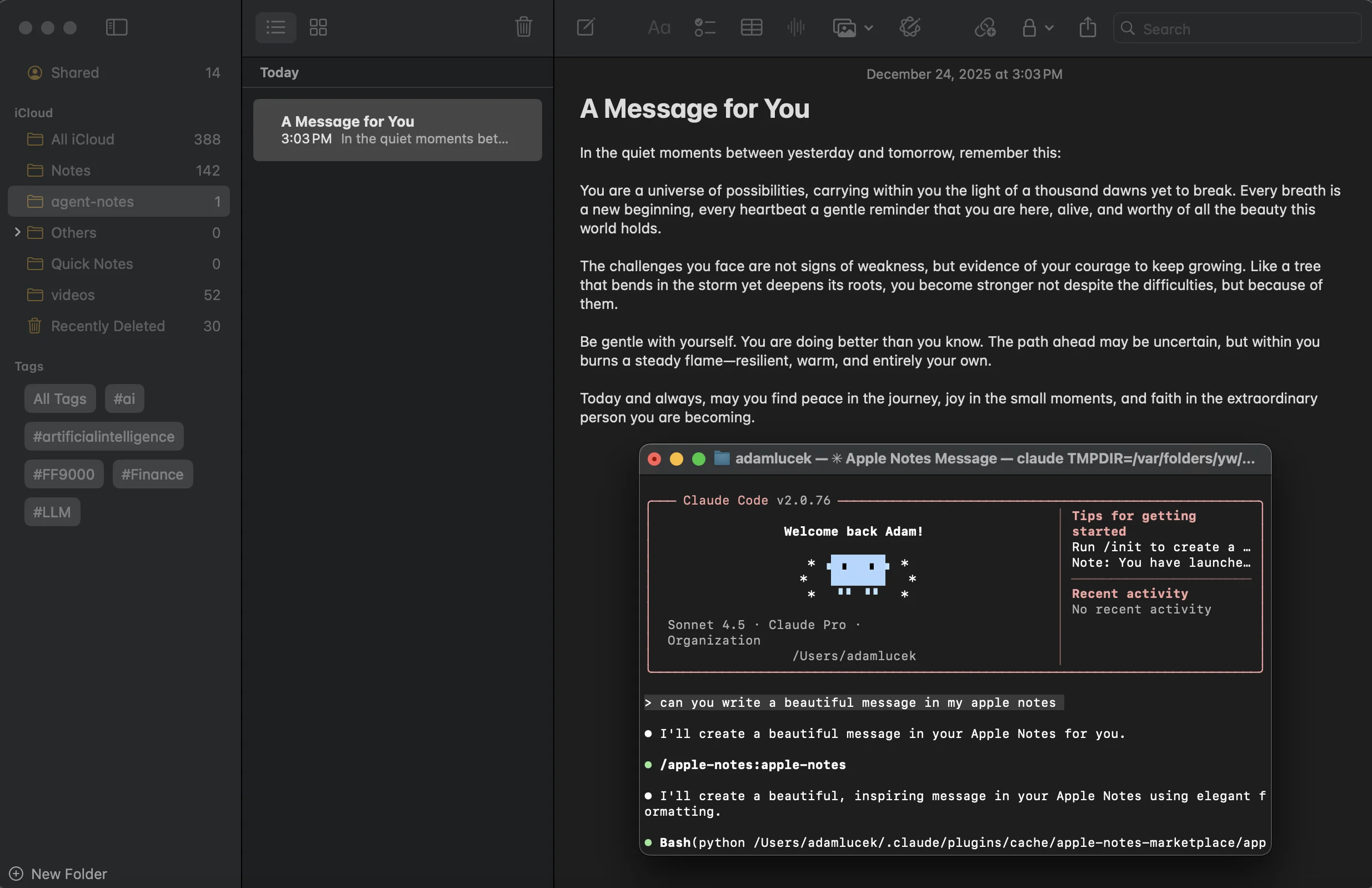
Success
Mastering the Art
Skills offer an interesting and powerful way to guide and personalize popular filesystem-based agent harnesses. I can see Skills being adopted more widely as users find more value in general LLM-based assistants, and as those assistants are developed with these specific capabilities (e.g., Claude Code).
Skills are something I’ve already adopted, not just because of the benefits outlined above, but also for the discipline of truly thinking through workflows for ML/AI/LLM-based automation. When considering where agents are best applied, it requires this kind of documentation and pre-work. To the practitioner, Agent Skills offer a convenient way to package the work that’s already been done, and empower workflow owners to compartmentalize and define their own skills. Once created, a capable agent harness can actually execute it.
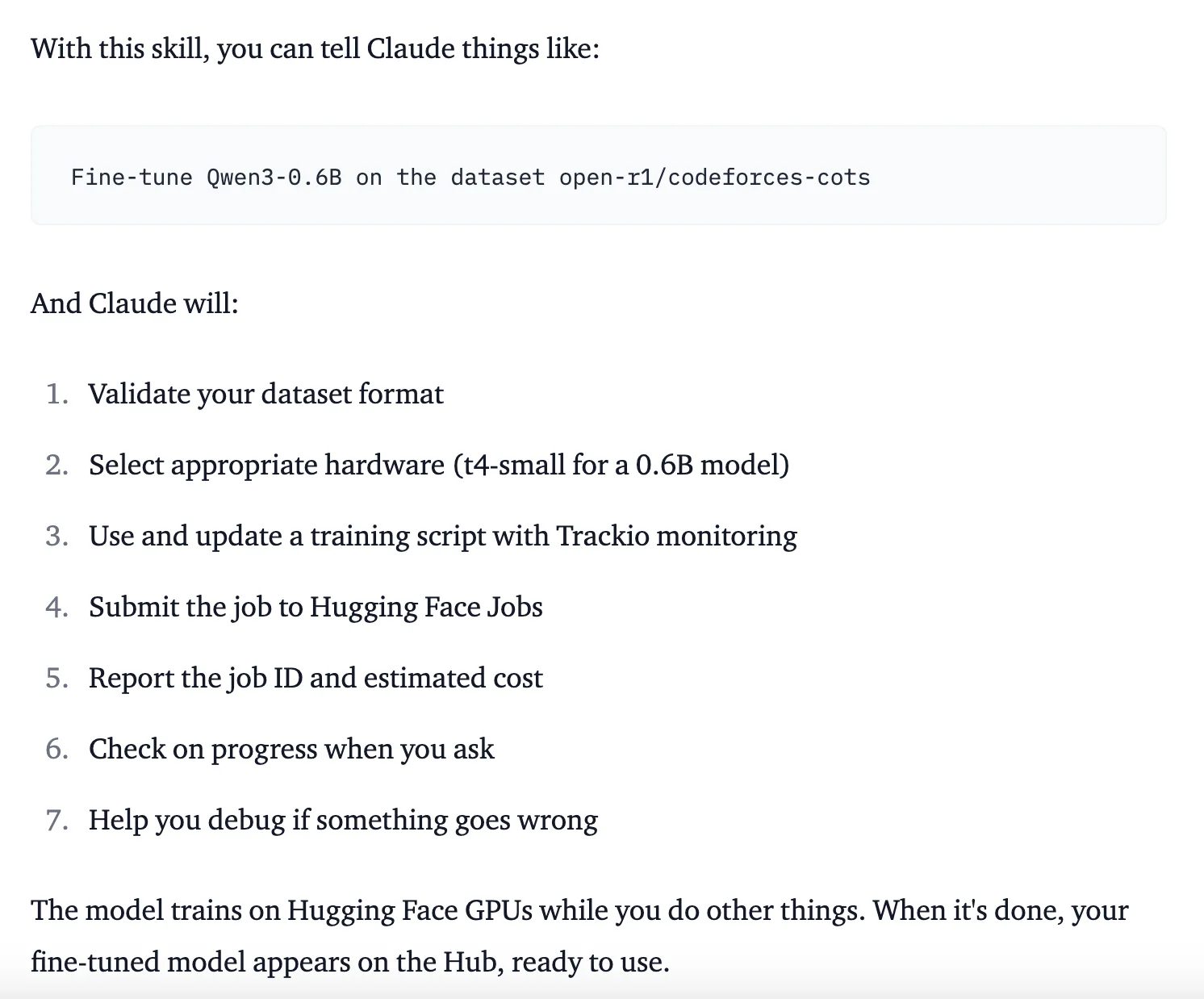
We Got Claude to Fine-Tune an Open Source LLM
This has already been demonstrated in some impressive ways. Notably, the Hugging Face team created an ‘hf-llm-trainer’ skill that encapsulates their LLM training ecosystem and instructions into a full Skill, allowing a CLI agent (e.g., Claude Code) to validate, monitor, and train language models using their services. It’s worth checking out the SKILL.md for this one, as it shows a successful, yet complex, domain specific application of Agent Skills.
Note: With the release of Agent Skills, Anthropic also open sourced many of their internal and assistant specific skills, available here!
In the future, I can imagine a world where Agent Skills and instruction prompts, like those in the AGENTS.md standard, are packaged together to create off-the-shelf agents with supporting harnesses, allowing for an easy way to share and distribute domain specific knowledge to already capable agent harnesses. Regardless, we can always benefit from thinking through a process and creating clear documentation.